
While the products on an OpenCart website may be great, the prices competitive, and the content helpful, its poor visibility in organic search might be due to basic issues being overlooked. These include broken redirects, missing meta tags, poor internal linking, indexing problems, and non-existent or wrongly configured sitemaps, all of which affect the crawling and maintenance of a massive catalog.
There could be a need for an OpenCart SEO extension to address all these problems in one package rather than having the store owner review hundreds of products and categories manually.
This is seen in the SEO extension for OpenCart by Knowband, which combines page audit along with redirects, sitemaps, metadata, 404 error checking, and other kinds of technical testing. A module installed in your online store does not necessarily mean that it will affect the ranking of your webpages in a positive manner. In the documentation published by Google, we can see that a sitemap is used for discovery and does not promise crawling and indexing of your pages, and redirects tell Google that a certain URL has been changed. SEO tools are useful because they help store teams find problems and act on them consistently.
Why Technical SEO Matters More as Your OpenCart Store Grows
A small brochure website might only have a few dozen important URLs. But an online store can have many products, categories, manufacturers, information pages, and even variations.
That scale changes the maintenance problem. A URL structure can change during a catalog cleanup, products can be discontinued, category names can be edited, and metadata can remain blank on newly added products. A mistake repeated across 500 pages is no longer a one-page SEO issue.
Extensive research has revealed how many stores lack these essential elements. As per the study conducted by Ahrefs, 72.9% of websites lacked any kind of meta description tag.
That figure doesn’t mean every missing description causes a ranking loss. Google explains that it often generates snippets from page content and may use a meta description when that description better represents the page. The practical lesson is simpler: important commercial pages should not be allowed to accumulate incomplete or generic metadata without review.
An effective SEO audit goes beyond checking individual keywords. It also involves reviewing technical issues, metadata, internal linking, and crawlability to identify problems that may prevent important store pages from performing well in search results. This broader approach is also discussed in this guide to lessons learned from ecommerce SEO audits.
Broken redirects can leave valuable URLs behind
Product catalogs change constantly. A product gets renamed, a category is reorganized, an old collection disappears, or a store owner changes the SEO URL to make it cleaner.
The problem begins when the old address continues to receive visits or links but no longer resolves correctly.
Google suggests using a permanent redirect when changing the current URL address to a new one. With a permanent redirect, Google will treat the new URL address as the canonical one, whereas a 302 is a temporary one.
For an OpenCart store, consider a product that originally used:
/winter-jacket
and later becomes:
/mens-winter-jacket
Changing the SEO URL does not mean that all references to the old URL have been automatically sorted out. There might still be bookmarks, links, or references on some search engines to the old URL.
A useful redirect workflow should answer three things:
- Does the old URL still receive requests?
- Is there a genuinely relevant replacement?
- Does the redirect point directly to the final destination?
The last point matters. A chain such as old URL → intermediate URL → final URL creates unnecessary complexity. Therefore, it would be better if the source could be redirected straight to the final destination.
OpenCart SEO Audit Manager features include URL redirection, URL redirect types such as 301, 302, and 303 redirects, bulk CSV import, and 404 URL detection. Thus, it can be used when there is a change in the URLs of a relatively large catalog instead of changing page by page.
Missing metadata weakens page-level relevance
Product and category pages often get published before anyone checks the search-facing fields.
A page may have a product name but no useful meta title. A category may have a title but a blank description. Hundreds of pages may even inherit similar metadata, making it difficult to distinguish one commercial page from another in search results.
Google recommends descriptive titles and meta descriptions because unique page-level information helps communicate relevance to users. However, it is equally important to note that, according to Google documentation, meta descriptions do not assure the inclusion of your information verbatim by Google; it may create its own snippet.
That is why metadata should be treated as part of page quality rather than as a magic ranking field.
For a store selling hundreds of similar products, useful metadata should reflect the actual page. A generic description like “buy quality products at the best price” does not tell either the consumer or the search engine anything specific about a particular product.
The OpenCart SEO Plugin by Knowband helps in the creation of page-level SEO scoring and examines title/description length, keyword usage, image ALT text, internal linking, and canonical URLs. The scoring of the plugin is more in the nature of a checklist of problems.
That distinction is worth keeping in mind. A score can tell a store owner where to investigate. Ultimately, the decision on the exact wording depends on the catalog manager.
How Can an XML Sitemap Be Beneficial for Crawling an OpenCart Store?
A sitemap is very helpful if the number of your products and their structure are complicated.
According to Google, properly linked pages may often be found without a sitemap. It also notes that sitemaps allow better crawling of complex websites or sites with more pages and can assist search engines in finding some URLs. But a sitemap cannot be treated as a guarantee that all the URLs submitted to the sitemap will be crawled and indexed.
It is crucial for OpenCart store owners to distinguish between these two phrases: “We have a sitemap” vs “Our sitemap is healthy.”
A store should check whether the sitemap:
- actually loads at its public URL,
- contains the URLs that should be discoverable,
- avoids obsolete or inappropriate URLs,
- is submitted to Google Search Console,
- and is monitored for processing warnings or errors.
The OpenCart SEO Audit Manager provides XML and HTML sitemap management, including controls for product, category, information, and manufacturer URLs. In addition, it gives sitemap submission checks for the status of the submitted URLs, warnings, errors, and the number of URLs in the sitemap.
The sitemap should not be regarded as something that only has to be set up once.
Although the technical checks vary by ecommerce platform, a structured audit checklist can help store owners identify missing metadata, crawlability issues, and other on-page SEO problems. For a platform-specific perspective, see this practical eCommerce SEO audit checklist.
404 errors need context before you redirect them
A 404 error basically means that the resource which has been requested is not available at that address. A 404 error doesn’t mean anything regarding the quality of SEO of the store.
What has to be identified is the cause behind the 404 error and whether there is another page that will fulfill the purpose of the request.
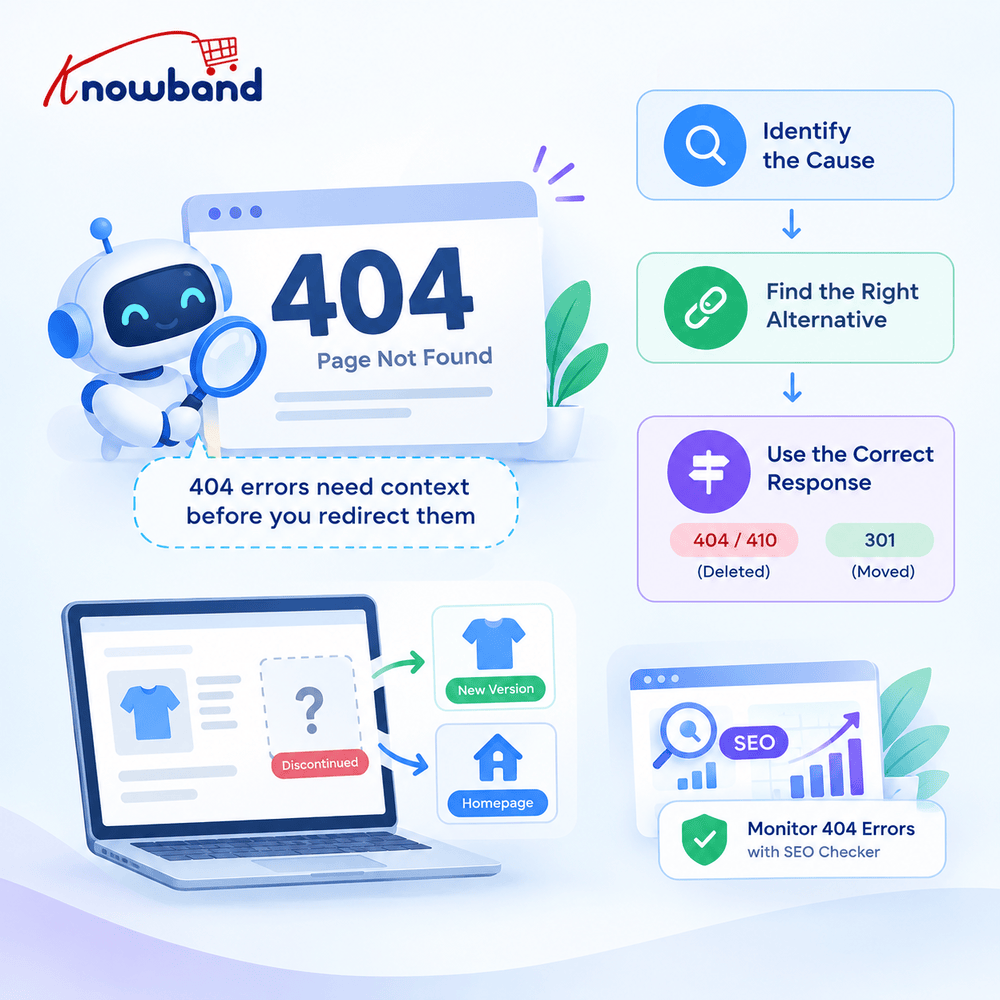
As per Google, there should be a 404 or 410 response if the resource has been permanently deleted without any replacement. If the resource has been moved to some other place, then it is better to use a 301 response.
That creates an important distinction for store owners.
Suppose a discontinued product has been replaced by the newer version of the same product. A redirect may make sense. In cases where there is no alternative product for the discontinued product, directing the user to the homepage just because it is accessible is a bad decision.
It is possible to monitor the storefront 404 errors using the SEO checker capability provided by this module.
This is a situation where automation should complement judgment and not the other way around.
Duplicate URLs can create unnecessary ambiguity
OpenCart stores can expose more than one URL for related content, especially when catalog structures or SEO URL configurations change.
The goal is not to make every URL disappear. The goal is to make the preferred version of a page clear.
A canonical URL is one signal that can help search engines understand which URL represents the preferred version of substantially similar content. Redirects can also affect canonical selection, which is why URL changes should be handled carefully rather than through isolated fixes. Google’s documentation specifically notes that incorrect canonical signals or redirects can result in unexpected URL selection.
Duplicate URL detection is therefore useful during catalog maintenance. If two pages are competing for the same SEO URL or if similar pages have unclear canonical signals, the issue should be investigated before adding more content.
The module’s URL Optimization area includes duplicate URL checking, while its page audits also examine canonical URL settings.
OpenCart store owners should review technical SEO issues alongside on-page elements to identify problems that may affect crawling and indexing. This OpenCart SEO audit process provides an additional resource for understanding the platform-specific audit workflow.
How to Fix Internal Linking and Crawlability Issues in OpenCart?
SEO problems aren’t always visible in page titles or metadata.
A product might be indexed but buried several clicks deep. A category might have products but no useful links from related content. An old internal link might still point to a deleted URL.
Good internal linking gives users sensible paths through the catalog and helps crawlers discover pages. The advice from Google is to make your links crawlable and create an ecommerce website in such a way that the valuable content becomes accessible to the crawler through the website structure.
It makes sense for an actual audit to begin with the most commercially valuable pages instead of working on fixing everything right away.
Focus on your most valuable categories, bestsellers, organically viewed pages, and pages with external links.
Then look for broken destinations, weak navigation paths, missing links from relevant content, and unnecessary duplication.
The OpenCart SEO Audit Extension also checks internal links as part of its page-level audit, alongside heading structure, image alt attributes, title and description length, and keyword placement.
Robots.txt can create a problem that looks like an indexing failure
A store can have excellent content and still prevent crawlers from reaching important resources through a badly configured robots.txt.
The file is supposed to show compliant crawlers what they shouldn’t be crawling. This particular feature doesn’t relate to deletion of URLs from Google search index.
As per Google, the robots.txt file shouldn’t be edited all the time.
OpenCart administrators should be particularly careful when copying robots.txt rules between environments. A rule that made sense on a development installation can have very different consequences when applied to a live storefront.
The module includes a live robots.txt editor and displays whether the file exists, allowing administrators to review and save its directives from the admin area.
How to turn an SEO audit into an actual maintenance routine
An audit becomes much more useful when the store team has a repeatable way to handle what it finds.
Start with issues that can block or misdirect users and crawlers. Then move toward page-level quality improvements.
A practical OpenCart audit cycle can look like this:
- Review the overall dashboard and identify major indexing, metadata, sitemap, and redirect problems.
- Check 404 requests and determine which URLs deserve a genuine replacement.
- Review changed or deleted product and category URLs for appropriate permanent redirects.
- Inspect important product and category pages for incomplete or unsuitable metadata.
- Verify the XML sitemap and its Search Console status.
- Review robots.txt before assuming an indexing problem is caused by page content.
- Check duplicate URLs and canonical signals where similar pages exist.
- Review internal links pointing to important commercial pages.
- Re-run page audits after making changes.
- Keep score history or snapshots so the team can compare the store’s technical condition over time.
This approach also helps developers and marketing teams work from the same list. Instead of saying that “SEO needs improvement,” the team can identify a specific group of URLs, the exact issue, and the action required.
The OpenCart SEO Audit Manager supports score history and snapshot comparison, which can provide a record of how the audited pages change after optimization work.
What an OpenCart SEO Extension can and cannot solve
An OpenCart SEO Extension can make technical maintenance more manageable, especially when a store has enough URLs that manual checking becomes unreliable.
But the tool doesn’t replace SEO judgment.
A redirect should lead to a relevant destination. A meta description should accurately describe the page. A sitemap should contain useful URLs. A robots.txt rule should have a clear reason for being there. A low audit score should lead to an actual review rather than an attempt to reach an arbitrary number.
Just as before, this rule applies to AI-generated content. The module is able to use ChatGPT to compose metadata and other SEO fields. Nevertheless, the generated content shall have to be verified before publishing it.
Google Analytics 4, Google Search Console, and PageSpeed Insights reports of Knowband’s OpenCart SEO Extension will be connected with its analytics section as well.
The practical takeaway for OpenCart stores in 2026
SEO maintenance isn’t about chasing every warning produced by an audit tool. The useful work is finding problems that affect important URLs, understanding why they exist, and fixing them without creating another technical problem somewhere else.
A broken redirect may need a direct 301. A genuine dead page may need to remain a 404. A blank meta description deserves attention, but Google may still generate a snippet from the page. A sitemap helps discovery, but submitting one doesn’t guarantee indexing.
That is the level of judgment an effective SEO process needs.
Manually checking every product URL, redirect, metadata field, and sitemap entry can become time-consuming as an OpenCart store grows. A systematic audit can help store owners identify technical SEO issues and prioritize the fixes that need attention. The Knowband OpenCart SEO Audit Manager is worth exploring for merchants looking for an OpenCart-focused approach to SEO auditing. Review its features to determine whether they match your store’s requirements.
The OpenCart SEO Audit Extension is also available on the OpenCart Marketplace. Click here to visit the page

