
php2shell: What OpenCart Store Owners Should Check After the Critical PHP Updates
On 21 October 2026, PHP released fixes for two critical vulnerabilities, CVE-2026-109618 and CVE-2026-109619. Both are rated 9.2 on CVSS and have been nicknamed “php2shell”. OpenCart runs on PHP, so any store on an unpatched server is within scope, and there’s a second question worth asking at the same time: does the installed OpenCart version actually work on the patched PHP?
At Knowband, we are actively working to support our clients in addressing the potential impact of the October 21, 2026, PHP security updates. Our team is helping clients assess their OpenCart stores, review PHP compatibility, and identify any potential security concerns. We understand the importance of keeping your store secure and operational, and we are committed to providing the necessary technical assistance and guidance throughout this process.
What the vulnerabilities are
Two separate memory bugs in the PHP engine. CVE-2026-109618 turns up when PHP runs out of memory in the middle of a request. It stops partway through setting up the request data, and the cleanup code then carries on as if that half-finished data were fine. CVE-2026-109619 is more of a leftover problem. State from one request is still sitting there after its memory was released, and the next request handled by the same worker can pick it up and reuse it.
The PHP Security Team describes the outcome as crashes, data exposure or remote code execution from crafted HTTP requests, with no authentication needed.
Why updating OpenCart does not fix it
These bugs live in PHP itself. OpenCart didn’t cause them, so a core upgrade or fresh extension versions won’t touch them. The attack can also happen before any application code runs, which means in-store measures like a renamed admin folder or a security extension can’t be relied on. Only a PHP update closes the gap. As far as could be found, OpenCart hasn’t published an advisory on this, so what follows comes from the PHP and EU sources and from OpenCart’s release coverage.
Step 1: check the PHP version actually serving the store
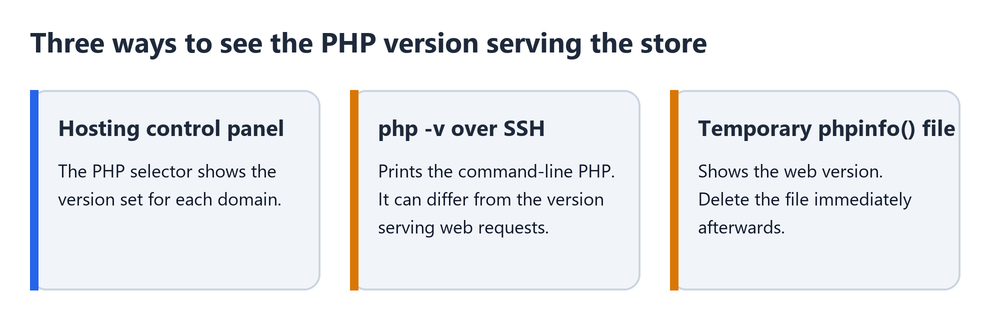
Start with the hosting control panel. Most have a PHP selector that lists the version for each domain. SSH is the other route, using php -v, but that prints the command-line PHP, and the web server may be running something else entirely. A temporary phpinfo() file shows the web version. It needs deleting straight afterwards.
Patched releases are PHP 8.5.12, 8.4.27, 8.3.36 and 8.2.35, with minimal backports for 7.4, 8.0 and 8.1. Distributions sometimes patch their packages and leave the version string alone, so an old-looking number isn’t proof of a problem. The host, or the distribution’s security notes, has to confirm it.
Step 2: check which PHP versions the installed OpenCart supports
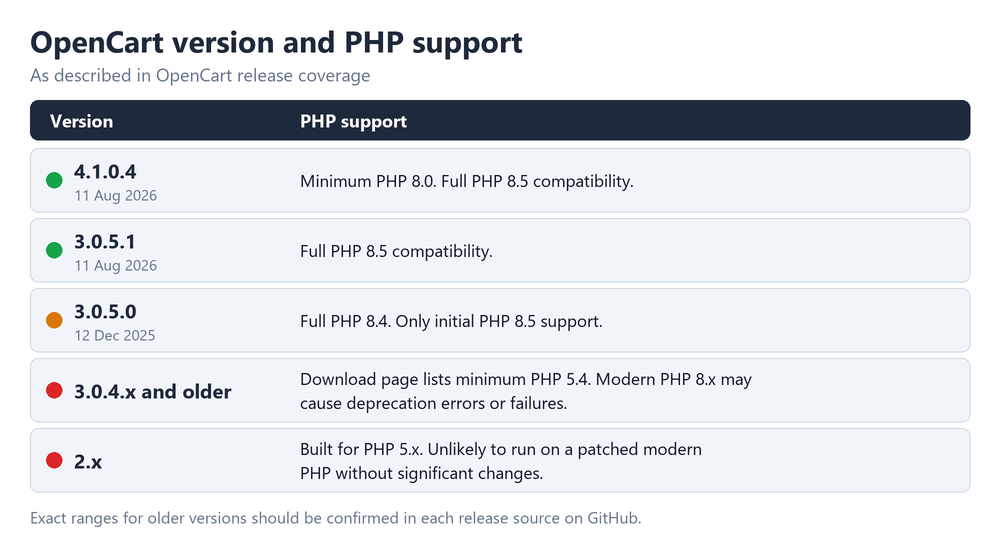
This is where older stores get stuck. According to the release coverage:
- 4.1.0.4 (11 August 2026): needs PHP 8.0 or higher, fully compatible with PHP 8.5.
- 3.0.5.1 (11 August 2026): fully compatible with PHP 8.5.
- 3.0.5.0 (12 December 2025): fully compatible with PHP 8.4, only initial support for PHP 8.5.
Older 3.0.4.x builds are murkier. The official download page still lists PHP 5.4 as the minimum, and a GitHub issue says 3.0.3.8 needs at least 7.3 in practice. On modern PHP 8.x, deprecation errors are likely, and outright failures are possible. The 2.x branch was built for PHP 5.x and probably won’t run on a patched modern PHP without significant changes. The official requirements page is outdated, so exact ranges for older versions are best checked in each release’s source on GitHub.
Release coverage leans towards PHP 8.2 or 8.3 for production over the next 6 to 12 months, with PHP 8.5 tried on a staging copy first.
Step 3: shared or managed hosting
On shared or managed hosting, patching is the host’s job, so the only move is to ask. A plain question works: is the fix for both CVEs applied to the PHP version this store runs on? Get the reply in writing. The EU joint statement (European Commission DG CNECT, ENISA, CERT-EU, Europol EC3 and the CSIRTs Network) says the same for organisations in general: list the PHP-based applications, work with hosting providers, and put internet-facing systems first.
Step 4: self-managed servers
Install the patched packages, then restart every PHP process that serves the store: PHP-FPM, Apache, LiteSpeed or FrankenPHP, whichever applies. An update that was installed but never reloaded can keep running the old code. With Docker, the image has to be rebuilt on a patched base, since restarting an old container changes nothing.
Step 5: test the store after the update
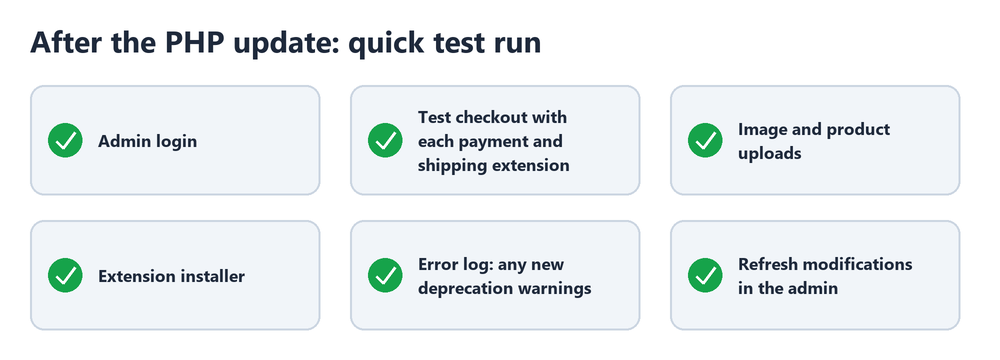
A newer PHP can bring up problems that stayed hidden before, so a short test run pays off:
- Admin login
- A test checkout through every payment and shipping extension in use
- Image and product uploads
- The extension installer
- The error log, watching for new deprecation warnings
- Refresh modifications in the admin
If the update cannot be applied immediately
According to the PHP team, no complete mitigation exists, so anything here only reduces exposure. Lower post_max_size and keep upload_max_filesize under it, though values that are too tight can break uploads and the extension installer. session.upload_progress.enabled=0 belongs in php.ini or the pool config, because ini_set() and .user.ini don’t work for it. On PHP 8.5 only, fatal_error_backtraces=0 is also listed. Workers need a restart for any of it to apply. Hiding errors doesn’t help.
A WAF adds a layer, but it can be bypassed if the origin server is reachable directly, and signature-based rules can be bypassed too. It doesn’t replace the update. Where patching isn’t immediately possible, the EU guidance suggests considering isolating exposed applications from the public network until it is.
Stores on older PHP and older OpenCart versions
PHP 8.1 and older no longer get official updates, so for those stores the question is whether the host’s package is patched. PHP 8.2 reaches end of life on 31 December 2026. Stores on 3.0.4 or older are better off moving to 3.0.5.x or 4.1.x first and raising PHP afterwards, since jumping PHP versions on an old core tends to break checkout.
Anyone heard back from a host yet? Written confirmation, or just a reassuring reply, and did any OpenCart version misbehave after the update?
For more details about the PHP2Shell vulnerabilities and the recommended security measures for PrestaShop merchants, read our guide: Critical PHP Vulnerabilities (php2shell): What PrestaShop Merchants Need to Do.


