
Ask any OpenCart merchant what happens to their contact form submissions, and most will admit the same thing: half of them never arrive, and the ones that do are hard to act on. Baymard’s UX research ties this directly to revenue, not just annoyance; poorly designed forms lead to frustrated users, abandoned carts, and a spike in support complaints. A form isn’t a background utility. It’s the one place a customer hands you information directly.
Is your current contact page actually built to be filled out, or just built to exist? An OpenCart Form Builder Plugin is supposed to solve exactly this, and an OpenCart form builder solution built around real UX principles closes the gap before it costs you a submission.
Why Poor Form Design Costs You Conversions
Form abandonment isn’t a mystery. Shopify’s UX team points to the same handful of causes across ecommerce sites: too many fields, unclear labels, no mobile optimization, and validation that only tells a customer they made a mistake after they’ve already submitted.
Every one of those is fixable without a redesign. Most stores just never audit their forms the way they audit their checkout, even though a contact or feedback form is often the first direct interaction a new customer has with the brand.
6 Form UX Principles Every eCommerce Store Should Follow
Each of these maps to a specific reason people abandon forms, not a vague style preference:
- Ask only for what you need. Every extra field is a reason to leave; combine related fields like name and email into a compact layout.
- Keep labels visible, not disappearing placeholders. Nielsen Norman Group’s research shows that top-aligned labels that stay in place improve scanning and completion speed.
- Validate as the customer moves between fields, not only after they hit submit, so errors get caught while the context is still fresh.
- Design for mobile first. A majority of eCommerce visitors are on a phone, and a form that requires pinch-zooming loses them immediately.
- Add silent spam protection. A visible CAPTCHA puzzle adds friction for real customers; invisible checks catch bots without slowing anyone down.
- Confirm what happens next. A clear thank-you message or auto-reply tells the customer their submission actually went somewhere, the same logic that makes an OpenCart Survey Extension useful for post-purchase feedback, not just contact forms.
What to Look for in an OpenCart Form Builder Plugin
An OpenCart Form Builder Plugin is admin-panel software that lets a store owner create contact, survey, feedback, and lead-generation forms through a drag-and-drop layout editor, with no custom code required. The distinction that matters is whether it also handles what happens after submission, routing, spam filtering, and follow-up, not just the fields on the page.
Most merchants judge these tools purely on how the form looks. The bigger question is whether submissions actually reach someone and whether bots can flood the inbox in the meantime.
| Form Problem | Fix | Where It Lives |
|---|---|---|
| Too many required fields | Combine or remove non-essential fields | Form layout editor |
| Labels vanish on click | Use static, top-aligned labels | Field configuration |
| Errors only show after submission | Field-level inline validation | Form settings |
| Bots flood the inbox | Silent spam protection (no CAPTCHA puzzle) | Spam protection settings |
| No confirmation for the customer | Custom thank-you message or auto-reply | Thank You Page / Mail settings |
The OpenCart Form Studio Built Around These Principles
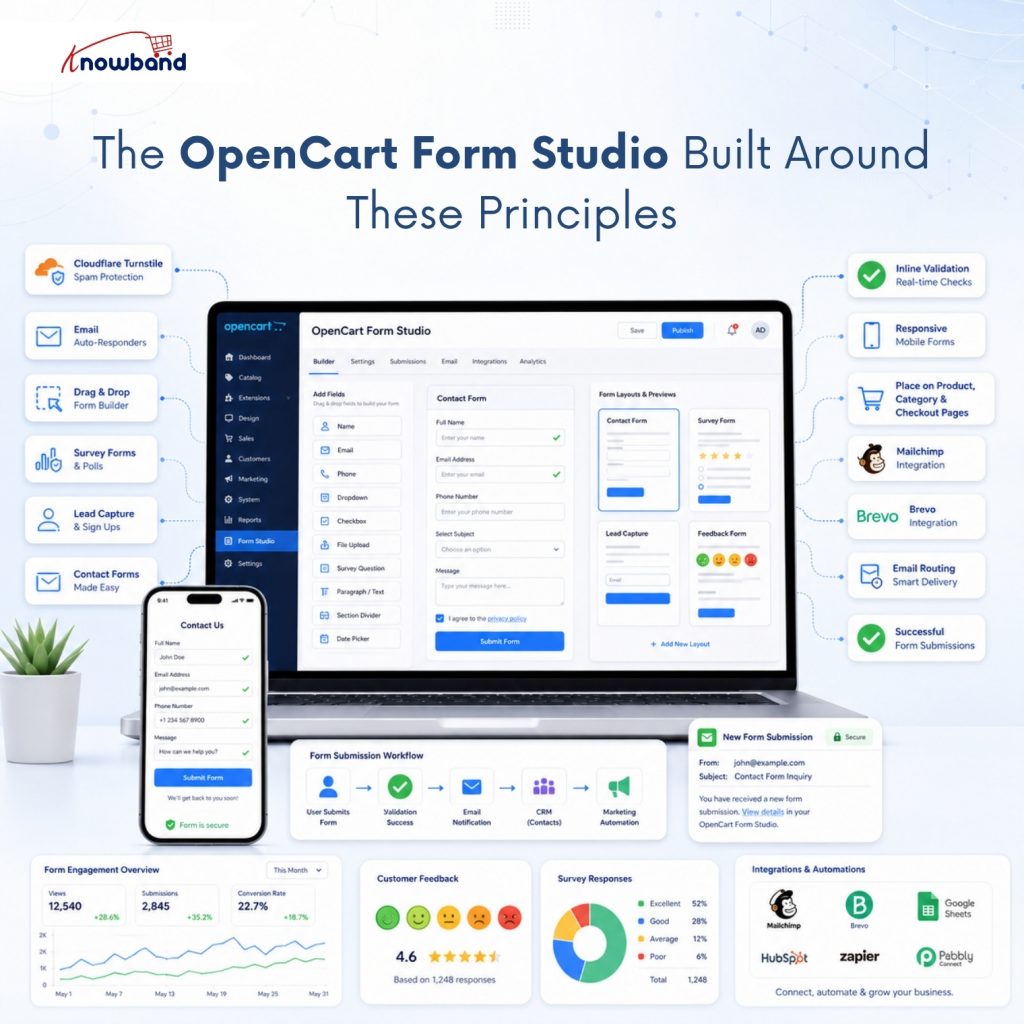
Knowband’s OpenCart Form Studio answers the gap the table above shows: a drag-and-drop builder for contact, survey, and lead-capture forms that also covers spam filtering and follow-up, instead of leaving those as an afterthought. It works as an OpenCart Survey Extension just as easily as a general contact-form tool, since every form runs on its own layout, placement rules, and email routing.
Cloudflare Turnstile handles spam protection without showing customers a puzzle, per-form auto-responders to confirm receipt immediately, and the Placements tab drops any form onto product, category, or checkout pages without touching the theme. Mailchimp and Brevo sync means a captured email doesn’t sit idle in a submissions table either.
Building Your First User-Friendly Form Without a Developer
Start with the fields you’re already collecting manually through email and cut anything you don’t act on. A five-field contact form beats a twelve-field one every time, regardless of how the rest of the design looks. Whether you’re building a simple contact page or using a full OpenCart Online Form Builder Extension for multi-step lead capture, the same rule applies: fewer fields, faster completion.
Turn on inline validation before you publish anything, since retrofitting it after complaints start is the same fix done under pressure. Set the auto-responder next, even a two-line confirmation, so customers know their submission landed somewhere real rather than a void. Knowband’s own documentation for the extension walks through each of these settings tab by tab, which is worth a look before your first form goes live.
An OpenCart Form Builder Plugin Is Only as Good as Its UX
None of the six principles above requires a rebuild. An OpenCart Form Builder Plugin that handles layout, validation, and spam protection together removes the excuse for shipping a form that only looks finished.
If lead-generation or post-purchase feedback is the gap in your current setup, an OpenCart Online Form Builder Extension covers both alongside the layout and spam-protection basics above. Knowband built this specifically so merchants stop treating forms as an afterthought bolted onto the contact page.


